
When a product has no stock, your store does not lose the customer: instead of Add to Cart, the product page offers Request product, and the customer leaves their details for you to contact them when it is back. This guide covers what the customer does and what you receive.
What the customer does
The button Request product appears on a product's page when the product, or the combination the customer chose, has no stock. See Variants and inventory. Clicking it opens a form:
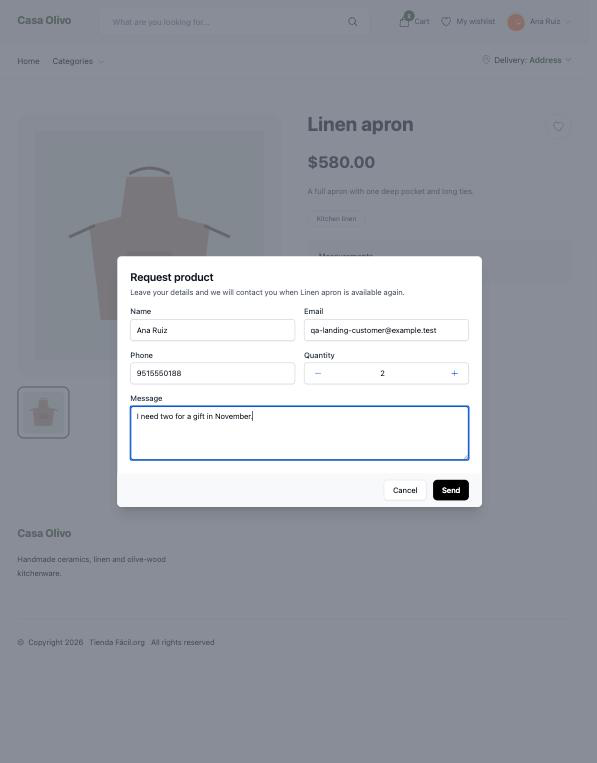
| Field | |
|---|---|
| Name | Required. |
| Required. Already filled in when the customer is signed in. | |
| Phone | Optional. |
| Quantity | Optional, 1 by default. |
| Message | Optional, up to 1,000 characters. |
When they send it, the customer sees We will contact you when the product is available again and receives an email confirming you got their request for that product.
What you receive
The people chosen in Settings → Emails → Users who receive stock request notifications are notified of each request, with the customer's name, email, phone, quantity and message. The notification reaches them the way each person receives the platform's notifications: always inside the panel, and also by email or on their phone when they have those turned on.
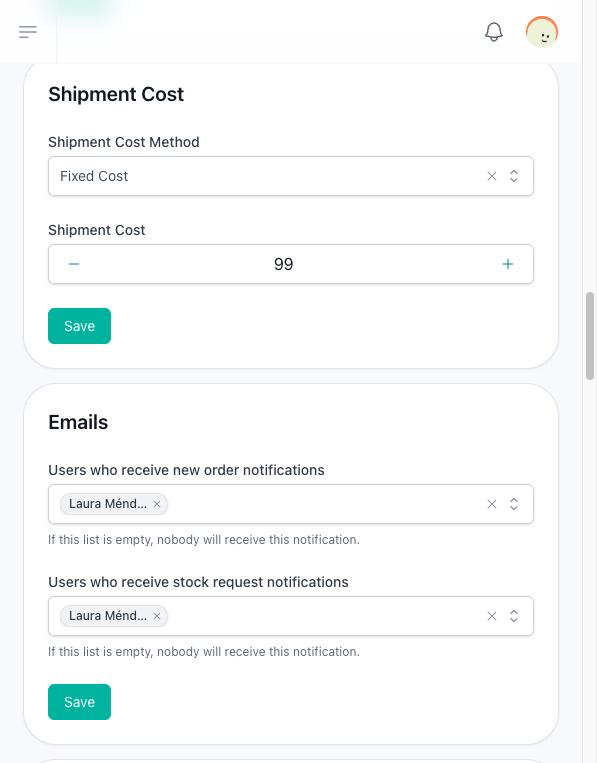
When the store is created, only its owner is on that list. If the list is empty, nobody is notified, although the request is still saved.
The list of requests
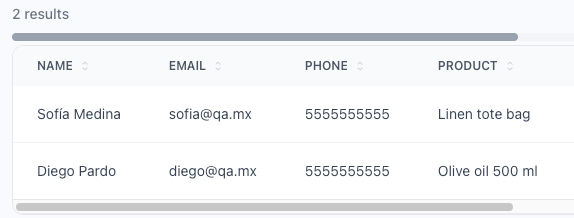
Sells → Stock Requests lists every request with the customer's name, email and phone, the product, the combination when there is one, the quantity and the date. Open a request to read its message. You can delete a request once you have dealt with it; requests cannot be created or edited from the panel.
When the product is back
Nothing is sent automatically when you add stock again. Use the list to contact each customer yourself.